Показаны сообщения с ярлыком db theory. Показать все сообщения
Показаны сообщения с ярлыком db theory. Показать все сообщения
5 июня 2012 г.
4 августа 2011 г.
oracle: Транзакции
Transactions
Выдержки из Тома Кайта.
Транзакции в Oracle удовлетворяют всем требуемым характеристикам ACID.
Аббревиатура ACID означает:
• атомарность (atomicity) — выполняется либо вся транзакция целиком, либо она целиком не выполняется;
• согласованность (consistency) — транзакция переводит базу данных из одного согласованного состояния в другое;
• изоляция (isolation) — эффект от транзакции не виден другим транзакциям до тех пор, пока она не будет зафиксирована;
• устойчивость (durability) — как только транзакция зафиксирована, она остается постоянной.
Атомарность
Рассмотрим пример:
Создадим таблицы T(вставляем сюда строки) и T2(содержит счётчик строк в таблице T), и триггер, который при вставке строки в T, увеличивает значение счётчика в Т2, при удалении - уменьшает.
Выдержки из Тома Кайта.
Транзакции в Oracle удовлетворяют всем требуемым характеристикам ACID.
Аббревиатура ACID означает:
• атомарность (atomicity) — выполняется либо вся транзакция целиком, либо она целиком не выполняется;
• согласованность (consistency) — транзакция переводит базу данных из одного согласованного состояния в другое;
• изоляция (isolation) — эффект от транзакции не виден другим транзакциям до тех пор, пока она не будет зафиксирована;
• устойчивость (durability) — как только транзакция зафиксирована, она остается постоянной.
Атомарность
Рассмотрим пример:
Создадим таблицы T(вставляем сюда строки) и T2(содержит счётчик строк в таблице T), и триггер, который при вставке строки в T, увеличивает значение счётчика в Т2, при удалении - уменьшает.

26 июля 2011 г.
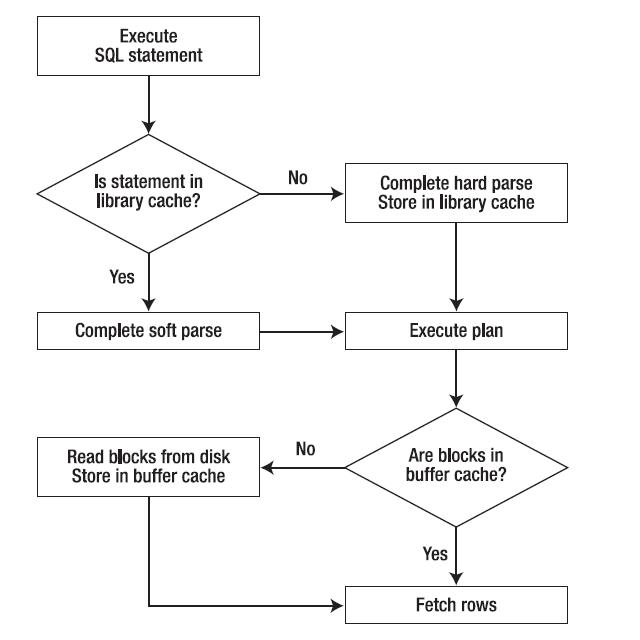
oracle: library cache
Library cache - часть shared pool, область памяти, которая содержит распарсенные выражения.
Парсинг включает в себя проверку синтаксиса выражения, проверку объектов, и проверку привелегий пользователя на эти объекты.
После Oracle проверяет есть ли уже такое же выражение, в library cache.
Soft parse - если выражение уже есть в library cache, то Oracle использует его оптимизированный вариант, его план выполнения.
Hard parse - если выражения нет в library cache, то Oracle оптимизирует выражение, строит новый план выполнения.
Соответсвенно, soft parse лучше чем hard parse с точки зрения производительности.
Посмотреть какие запросы находятся в library cache можно с помощью v$sql.
Пример. Выполним 3 вроде бы одинаковых запроса
select * from emp where deptno=10;
SELECT * FROM emp WHERE deptno = 10;
select /*comment*/ * from emp where deptno=10;
-- посмотрим что в library cache
select sql_text, hash_value, address, executions from v$sql where upper(sql_text) like '%EMP%';
--результат
Получилось 3 разных разобранных запроса.
Это получилось из-за того, что хоть запросы логически выглядят одинаково, но из-за различий в регистре и из-за комментария, Oracle распознал их как 3 разных запроса.
Парсинг включает в себя проверку синтаксиса выражения, проверку объектов, и проверку привелегий пользователя на эти объекты.
После Oracle проверяет есть ли уже такое же выражение, в library cache.
Soft parse - если выражение уже есть в library cache, то Oracle использует его оптимизированный вариант, его план выполнения.
Hard parse - если выражения нет в library cache, то Oracle оптимизирует выражение, строит новый план выполнения.
Соответсвенно, soft parse лучше чем hard parse с точки зрения производительности.
Посмотреть какие запросы находятся в library cache можно с помощью v$sql.
Пример. Выполним 3 вроде бы одинаковых запроса
select * from emp where deptno=10;
SELECT * FROM emp WHERE deptno = 10;
select /*comment*/ * from emp where deptno=10;
-- посмотрим что в library cache
select sql_text, hash_value, address, executions from v$sql where upper(sql_text) like '%EMP%';
--результат
| SQL_TEXT | HASH_VALUE | ADDRESS | EXECUTIONS |
|---|---|---|---|
| select * from emp where deptno=10 | 508465132 | 070000002C193B50 | 1 |
| SELECT * FROM emp WHERE deptno = 10 | 1243201595 | 070000002C14A328 | 1 |
| select /*comment*/ * from emp where deptno=10 | 330949115 | 070000002C143260 | 1 |
Получилось 3 разных разобранных запроса.
Это получилось из-за того, что хоть запросы логически выглядят одинаково, но из-за различий в регистре и из-за комментария, Oracle распознал их как 3 разных запроса.

13 июля 2011 г.
12 июля 2011 г.
oracle: Cartesian Joins
http://aguppi.blogspot.com/2011/07/oracle-table-joins.html
cbo-access-path
«… используется в случае, когда одна или несколько таблиц не имеют никаких условий (join conditions) для соединения с другими таблицами запроса. Оптимизатор соединяет каждую строку первого источника данных с каждой строкой другого, создавая картезианское произведение (Cartesian product) двух наборов данных»
cbo-access-path
«… используется в случае, когда одна или несколько таблиц не имеют никаких условий (join conditions) для соединения с другими таблицами запроса. Оптимизатор соединяет каждую строку первого источника данных с каждой строкой другого, создавая картезианское произведение (Cartesian product) двух наборов данных»
SQL> select job, dname from emp cross join dept;
SQL> select job, dname from emp, dept;

-----------------------------------------------------------------------------
| Id  | Operation            | Name | Rows  | Bytes | Cost (%CPU)| Time     |
-----------------------------------------------------------------------------
|   0 | SELECT STATEMENT     |      |    56 |  1008 |    10   (0)| 00:00:01 |
|   1 |  MERGE JOIN CARTESIAN|      |    56 |  1008 |    10   (0)| 00:00:01 |
|   2 |   TABLE ACCESS FULL  | DEPT |     4 |    40 |     3   (0)| 00:00:01 |
|   3 |   BUFFER SORT        |      |    14 |   112 |     7   (0)| 00:00:01 |
|   4 |    TABLE ACCESS FULL | EMP  |    14 |   112 |     2   (0)| 00:00:01 |
-----------------------------------------------------------------------------

SQL> select /*+ ORDERED*/ * from dept d, bonus b, emp e
 2  where d.deptno = e.deptno
 3  and b.ename = e.ename;

-------------------------------------------------------------------------------
| Id  | Operation             | Name  | Rows  | Bytes | Cost (%CPU)| Time     |
-------------------------------------------------------------------------------
|   0 | SELECT STATEMENT      |       |     1 |    96 |    10  (10)| 00:00:01 |
|*  1 |  HASH JOIN            |       |     1 |    96 |    10  (10)| 00:00:01 |
|   2 |   MERGE JOIN CARTESIAN|       |     1 |    59 |     6   (0)| 00:00:01 |
|   3 |    TABLE ACCESS FULL  | DEPT  |     4 |    80 |     3   (0)| 00:00:01 |
|   4 |    BUFFER SORT        |       |     1 |    39 |     3   (0)| 00:00:01 |
|   5 |     TABLE ACCESS FULL | BONUS |     1 |    39 |     1   (0)| 00:00:01 |
|   6 |   TABLE ACCESS FULL   | EMP   |    14 |   518 |     3   (0)| 00:00:01 |
-------------------------------------------------------------------------------
В последнем примере благодаря подсказке ORDERED оптимизатор первым делом соединяет таблицы DEPT и BONUS, не имеющих по условиям запроса никаких условий для соединения (join keys), следовательно, единственной возможной операцией оказывается Join Cartesian.
В случае, когда две небольшие таблицы (DEPT и BONUS) соединяются через условия d.deptno = e.deptno and b.ename = e.ename к «большой» таблице EMP и имеются дополнительные условия на столбцы небольших таблиц (фильтры dept.loc = ‘CHICAGO’ and bonus.comm > 30), оптимизатор по соображениям избирательности (selectivity) без всяких подсказок выбирает Merge Join Cartesian небольших таблиц с последующим соединением (Hash join) с большой таблицей:
SQL> exec dbms_stats.set_table_stats(ownname => 'SCOTT',tabname => 'EMP', numrows => 100000);

PL/SQL procedure successfully completed.

SQL> select * from dept d, bonus b, emp e
 2  where d.deptno = e.deptno and d.loc = 'CHICAGO'
 3  and b.ename = e.ename and b.comm > 30;

Execution Plan
-------------------------------------------------------------------------------
| Id  | Operation             | Name  | Rows  | Bytes | Cost (%CPU)| Time     |
-------------------------------------------------------------------------------
|   0 | SELECT STATEMENT      |       |  2381 |   174K|    16  (44)| 00:00:01 |
|*  1 |  HASH JOIN            |       |  2381 |   174K|    16  (44)| 00:00:01 |
|   2 |   MERGE JOIN CARTESIAN|       |     1 |    38 |     6   (0)| 00:00:01 |
|*  3 |    TABLE ACCESS FULL  | DEPT  |     1 |    18 |     3   (0)| 00:00:01 |
|   4 |    BUFFER SORT        |       |     1 |    20 |     3   (0)| 00:00:01 |
|*  5 |     TABLE ACCESS FULL | BONUS |     1 |    20 |     3   (0)| 00:00:01 |
|   6 |   TABLE ACCESS FULL   | EMP   |   100K|  3613K|     8  (63)| 00:00:01 |
-------------------------------------------------------------------------------

Predicate Information (identified by operation id):
---------------------------------------------------
 1 - access("D"."DEPTNO"="E"."DEPTNO" AND "B"."ENAME"="E"."ENAME")
 3 - filter("D"."LOC"='CHICAGO')
 5 - filter("B"."COMM">30)
Хинты
Можно использовать ORDERED
oracle: Sort Merge Joins
http://aguppi.blogspot.com/2011/07/oracle-table-joins.html
Sort Merge Joins (Oracle docs)
cbo-access-path
Sort merge joins используются для объединения строк из 2х независимых таблиц.
Sort merge joins успешно используется, когда в условиях соединения двух таблиц присутствуют операторы сравнения: <, <=, >, или >= , но не для операторов равества/неравества. Производительность sort merge joins лучше, чем у nested loop joins для больших наборов данных (data sets). [Также следует обратить внимание на то, что ] вы не можете использовать [более производительные операции] hash joins для соединения таблиц, если условия соединения отличаются от равенства (equality condition).
Sort merge joins лучше Hash Joins если:
Например, при использовании оператора сравнения «>» несвязанных столцов видим по одной операции SORT JOIN для каждой таблицы и объединённую операцию MERGE JOIN:
SQL> select * from emp e, dept d where e.empno > d.deptno;
Execution Plan
В случае с отсортироваными значениями одна из операций SORT JOIN исключается за ненадобностью:
SQL> select * from
2 (select empno from emp order by 1) e,
3 (select deptno from dept order by 1) d
4 where e.empno > d.deptno;
Execution Plan
Хинты
/*+ USE_MERGE( tab1 tab2) */
Sort Merge Joins (Oracle docs)
cbo-access-path
Sort merge joins используются для объединения строк из 2х независимых таблиц.
Sort merge joins успешно используется, когда в условиях соединения двух таблиц присутствуют операторы сравнения: <, <=, >, или >= , но не для операторов равества/неравества. Производительность sort merge joins лучше, чем у nested loop joins для больших наборов данных (data sets). [Также следует обратить внимание на то, что ] вы не можете использовать [более производительные операции] hash joins для соединения таблиц, если условия соединения отличаются от равенства (equality condition).
Sort merge joins лучше Hash Joins если:
- строки уже отсортированы
- операция сортировки не должна выполняться
- Sort join: Оба источника входных данных / таблицы сортируются по ключу соединения (join key).
- Merge join: Совместная обработка / объдинение (merging) отсортированных списков.
Например, при использовании оператора сравнения «>» несвязанных столцов видим по одной операции SORT JOIN для каждой таблицы и объединённую операцию MERGE JOIN:
SQL> select * from emp e, dept d where e.empno > d.deptno;
Execution Plan
----------------------------------------------------------------------------------------
| Id  | Operation                     | Name   | Rows  | Bytes | Cost (%CPU)| Time     |
----------------------------------------------------------------------------------------
|   0 | SELECT STATEMENT              |        |    56 |  3192 |     6  (17)| 00:00:01 |
|   1 |  MERGE JOIN                   |        |    56 |  3192 |     6  (17)| 00:00:01 |
|   2 |   SORT JOIN                   |        |    14 |   518 |     2   (0)| 00:00:01 |
|   3 |    TABLE ACCESS BY INDEX ROWID| EMP    |    14 |   518 |     2   (0)| 00:00:01 |
|   4 |     INDEX FULL SCAN           | PK_EMP |    14 |       |     1   (0)| 00:00:01 |
|*  5 |   SORT JOIN                   |        |     4 |    80 |     4  (25)| 00:00:01 |
|   6 |    TABLE ACCESS FULL          | DEPT   |     4 |    80 |     3   (0)| 00:00:01 |
----------------------------------------------------------------------------------------
Predicate Information (identified by operation id):
---------------------------------------------------
5 - access(INTERNAL_FUNCTION("E"."EMPNO")>INTERNAL_FUNCTION("D"."DEPTNO"))
filter(INTERNAL_FUNCTION("E"."EMPNO")>INTERNAL_FUNCTION("D"."DEPTNO"))
В случае с отсортироваными значениями одна из операций SORT JOIN исключается за ненадобностью:
SQL> select * from
2 (select empno from emp order by 1) e,
3 (select deptno from dept order by 1) d
4 where e.empno > d.deptno;
Execution Plan
------------------------------------------------------------------------------
| Id  | Operation          | Name    | Rows  | Bytes | Cost (%CPU)| Time     |
------------------------------------------------------------------------------
|   0 | SELECT STATEMENT   |         |    56 |   896 |     3  (34)| 00:00:01 |
|   1 |  MERGE JOIN        |         |    56 |   896 |     3  (34)| 00:00:01 |
|   2 |   INDEX FULL SCAN  | PK_DEPT |     4 |    12 |     1   (0)| 00:00:01 |
|*  3 |   SORT JOIN        |         |    14 |   182 |     2  (50)| 00:00:01 |
|   4 |    VIEW            |         |    14 |   182 |     1   (0)| 00:00:01 |
|   5 |     INDEX FULL SCAN| PK_EMP  |    14 |    56 |     1   (0)| 00:00:01 |
------------------------------------------------------------------------------
Predicate Information (identified by operation id):
---------------------------------------------------
3 - access("E"."EMPNO">"DEPTNO")
filter("E"."EMPNO">"DEPTNO")
Хинты
/*+ USE_MERGE( tab1 tab2) */
11 июля 2011 г.
oracle: hash Joins
http://aguppi.blogspot.com/2011/07/oracle-table-joins.html
Hash Joins (Oracle docs)
Hash Joins используются для объединения больших наборов данных.
Оптимизатор выбирает меньшую таблицу и создает хеш-таблицу для ключа объединения в памяти. Затем он просматривает другую таблицу(большую) и проверяет хеш таблицу в памяти на совпадения с ней.
Hash Join Hint
/*+ USE_HASH(tab1 tab2)*/
Hash Joins (Oracle docs)
Hash Joins используются для объединения больших наборов данных.
Оптимизатор выбирает меньшую таблицу и создает хеш-таблицу для ключа объединения в памяти. Затем он просматривает другую таблицу(большую) и проверяет хеш таблицу в памяти на совпадения с ней.
Hash Join Hint
/*+ USE_HASH(tab1 tab2)*/
SELECT /*+use_hash(employees departments)*/ *
FROM employees, departments
WHERE employees.department_id = departments.department_id;
8 июля 2011 г.
oracle: Nested Loop Joins
http://aguppi.blogspot.com/2011/07/oracle-table-joins.html
Nested Loop Joins (Oracle docs)
Nested Loops (объединения с вложенными циклами) - читает строку из 1й таблицы(ведущая таблица - outer table), и затем сравнивает всю 2ю таблицу(ведомая таблица - inner table) на совпадение, затем берёт следующую строку из 1й таблицы и опять сравнивает всю 2ю таблицу на совпадение и т.д.
Nested Loops hint
Используем хинт /*+ USE_NL*/, можно в связке с ORDERED, чтобы гарантировать нужный порядок обращения к таблицам.
Nested Loops быстро извлекают 1е несколько строк результирующего множества, но по общему времени выполнения Hash Joins быстрее. Этим свойством можно воспользоваться, когда пользователю нужно быстро получить 1е несколько строк, не дожидаясь всего результата.
В плане выполнения сначала идёт цикл по 1й таблице(outer loop) , а потом по 2й (inner loop)
В этом примере outer loop сначала получает все строки из таблицы EMPLOYEES, а затем для каждого сотрудника inner loop получает соответствующие строки из таблицы JOBS.
Nested Loops идеален, если 1я таблица маленькая, и объединённые столбцы проиндексированы уникально или этот индекс высоко избирательный.
Строка из 1й таблицы обычно получается из index scan или full table scan, а из 2й таблицы было бы идеально, чтобы строка выбиралась с помощью index scan.
Nested Loop Joins (Oracle docs)
Nested Loops (объединения с вложенными циклами) - читает строку из 1й таблицы(ведущая таблица - outer table), и затем сравнивает всю 2ю таблицу(ведомая таблица - inner table) на совпадение, затем берёт следующую строку из 1й таблицы и опять сравнивает всю 2ю таблицу на совпадение и т.д.
Nested Loops hint
Используем хинт /*+ USE_NL*/, можно в связке с ORDERED, чтобы гарантировать нужный порядок обращения к таблицам.
SELECT /*+ ORDERED USE_NL(customers) to get first row faster */
    accounts.balance, customers.last_name, customers.first_name
FROM accounts, customers
WHERE accounts.customer_id = customers.customer_id;
SELECT /*+ USE_NL(l h) */ h.customer_id, l.unit_price * l.quantity
  FROM orders h ,order_items l
 WHERE l.order_id = h.order_id;
Nested Loops быстро извлекают 1е несколько строк результирующего множества, но по общему времени выполнения Hash Joins быстрее. Этим свойством можно воспользоваться, когда пользователю нужно быстро получить 1е несколько строк, не дожидаясь всего результата.
В плане выполнения сначала идёт цикл по 1й таблице(outer loop) , а потом по 2й (inner loop)
NESTED LOOPSouter_loopinner_loop
...
|   2 |   NESTED LOOPS                |              |     3 |   141 |     7  (15)|
|*  3 |    TABLE ACCESS FULL          | EMPLOYEES    |     3 |    60 |     4  (25)|
|   4 |    TABLE ACCESS BY INDEX ROWID| JOBS         |    19 |   513 |     2  (50)|
|*  5 |     INDEX UNIQUE SCAN         | JOB_ID_PK    |     1 |       |            |
...
В этом примере outer loop сначала получает все строки из таблицы EMPLOYEES, а затем для каждого сотрудника inner loop получает соответствующие строки из таблицы JOBS.
Nested Loops идеален, если 1я таблица маленькая, и объединённые столбцы проиндексированы уникально или этот индекс высоко избирательный.
Строка из 1й таблицы обычно получается из index scan или full table scan, а из 2й таблицы было бы идеально, чтобы строка выбиралась с помощью index scan.
6 июля 2011 г.
oracle: sga_target
SGA_TARGET
| Property | Description |
|---|---|
| Parameter type | Big integer |
| Syntax | SGA_TARGET = integer [K | M | G] |
| Default value | 0 (SGA autotuning is disabled) |
| Modifiable | ALTER SYSTEM |
| Range of values | 64 to operating system-dependent |
| Basic | Yes |
SGA_TARGET specifies the total size of all SGA components. If SGA_TARGET is specified, then the following memory pools are automatically sized:- Buffer cache (
DB_CACHE_SIZE)
- Shared pool (
SHARED_POOL_SIZE)
- Large pool (
LARGE_POOL_SIZE)
- Java pool (
JAVA_POOL_SIZE)
- Streams pool (
STREAMS_POOL_SIZE)
The following pools are manually sized components and are not affected by Automatic Shared Memory Management:
- Log buffer
- Other buffer caches, such as
KEEP,RECYCLE, and other block sizes
- Fixed SGA and other internal allocations
oracle: sga_max_size
SGA_MAX_SIZE
| Property | Description |
|---|---|
| Parameter type | Big integer |
| Syntax | SGA_MAX_SIZE = integer [K | M | G] |
| Default value | Initial size of SGA at startup, dependent on the sizes of different pools in the SGA, such as buffer cache, shared pool, large pool, and so on. |
| Modifiable | No |
| Range of values | 0 to operating system-dependent |
SGA_MAX_SIZE specifies the maximum size of the SGA for the lifetime of the instance.
5 июля 2011 г.
oracle: Tables Joins (объединения таблиц)
Из Oracle9i Database Performance Tuning Guide and Reference Release 2 (9.2) Understanding Joins
CBO access path
Виды соединений:
Nested Loop Joins
Hash Joins
Sort Merge Joins
Cartesian Joins
Outer Joins
Как оптимизатор выбирает метод соединения
Оптимизатор оценивает стоимость каждого метода и выбирает самый дешёвый из них.
Как оптимизатор выбирает Execution Plan (план выполнения)
Оптимизатор должен решить в каком порядке соединять таблицы, т.е. какая таблица будет 1й, 2й и т.д.
Если нужно указать порядок соединения вручную, то используется хинт ORDERED (/*+ ORDERED */), тогда соединение осуществляется в том порядке, в котором указаны таблицы после from.
Например: select /*+ ORDERED*/ col1, col2, col3, col4 from t1, t2, t3
Это одинаково для CBO и RBO:
CBO access path
Виды соединений:
Nested Loop Joins
Hash Joins
Sort Merge Joins
Cartesian Joins
Outer Joins
Как оптимизатор выбирает метод соединения
Оптимизатор оценивает стоимость каждого метода и выбирает самый дешёвый из них.
- Nested Loop Joins обычно не эффективен при соединении большого кол-ва строк (обычно более 10 000 строк уже много). Стоимость Nested Loop Joins рассчитывается по формуле:
cost= access cost of A + (access cost of B * number of rows from A)
- Hash Joins эффективны для большого кол-ва строк. Стоимость Hash Joins рассчитывается по формуле:
cost= (access cost of A * number of hash partitions of B) + access cost of B
- При использовании RBO оптимизатора эффективны Merge Joins. Стоимость Merge Joins рассчитывается по формуле:
cost= access cost of A + access cost of B +(sort cost of A + sort cost of B)
Если данные уже отсортированы, то стоимость сортировки равна нулю.
Как оптимизатор выбирает Execution Plan (план выполнения)
Оптимизатор должен решить в каком порядке соединять таблицы, т.е. какая таблица будет 1й, 2й и т.д.
Если нужно указать порядок соединения вручную, то используется хинт ORDERED (/*+ ORDERED */), тогда соединение осуществляется в том порядке, в котором указаны таблицы после from.
Например: select /*+ ORDERED*/ col1, col2, col3, col4 from t1, t2, t3
Это одинаково для CBO и RBO:
- Оптимизатор определяет какая из таблиц вернёт не более чем одну строку основываясь на ограничениях
UNIQUEиPRIMARYKEYдля таблицы. Если такая ситуация действительна, то оптимизатор ставит эту таблицу на первое место в соединении - For join statements with outer join conditions, the table with the outer join operator must come after the other table in the condition in the join order. The optimizer does not consider join orders that violate this rule.
With the CBO, the optimizer generates a set of execution plans, according to possible join orders, join methods, and available access paths. The optimizer then estimates the cost of each plan and chooses the one with the lowest cost. The optimizer estimates costs in the following ways:
- The cost of a nested loops operation is based on the cost of reading each selected row of the outer table and each of its matching rows of the inner table into memory. The optimizer estimates these costs using the statistics in the data dictionary.
- The cost of a sort merge join is based largely on the cost of reading all the sources into memory and sorting them.
oracle: Sample Table Scans
http://aguppi.blogspot.com/2011/06/oracle-access-path.html
A sample table scan retrieves a random sample of data from a table. This access path is used when a statement's
FROM clause includes the SAMPLE clause or the SAMPLE BLOCK clause. To perform a sample table scan when sampling by rows (the SAMPLE clause), Oracle reads a specified percentage of rows in the table. To perform a sample table scan when sampling by blocks (the SAMPLE BLOCK clause), Oracle reads a specified percentage of table blocks.Oracle does not support sample table scans when the query involves a join or a remote table. However, you can perform an equivalent operation by using a
CREATE TABLE AS SELECT query to materialize a sample of an underlying table. You then rewrite the original query to refer to the newly created table sample. Additional queries can be written to materialize samples for other tables. Sample table scans require the CBO.Example 1-13 uses a sample table scan to access 1% of the
employees table, sampling by blocks.Example 1-13 Sample Table Scan
SELECT *
    FROM employees SAMPLE BLOCK (1);
The
EXPLAIN PLAN output for this statement might look like this:------------------------------------------------------------------------- | Id | Operation | Name | Rows | Bytes | Cost (%CPU)| ------------------------------------------------------------------------- | 0 | SELECT STATEMENT | | 1 | 68 | 3 (34)| | 1 | TABLE ACCESS SAMPLE | EMPLOYEES | 1 | 68 | 3 (34)| -------------------------------------------------------------------------
oracle: Hash Scans
http://aguppi.blogspot.com/2011/06/oracle-access-path.html
A hash scan is used to locate rows in a hash cluster, based on a hash value. In a hash cluster, all rows with the same hash value are stored in the same data block. To perform a hash scan, Oracle first obtains the hash value by applying a hash function to a cluster key value specified by the statement. Oracle then scans the data blocks containing rows with that hash value.
A hash scan is used to locate rows in a hash cluster, based on a hash value. In a hash cluster, all rows with the same hash value are stored in the same data block. To perform a hash scan, Oracle first obtains the hash value by applying a hash function to a cluster key value specified by the statement. Oracle then scans the data blocks containing rows with that hash value.
oracle: Cluster Scans
http://aguppi.blogspot.com/2011/06/oracle-access-path.html
A cluster scan is used to retrieve, from a table stored in an indexed cluster, all rows that have the same cluster key value. In an indexed cluster, all rows with the same cluster key value are stored in the same data block. To perform a cluster scan, Oracle first obtains the rowid of one of the selected rows by scanning the cluster index. Oracle then locates the rows based on this rowid.
A cluster scan is used to retrieve, from a table stored in an indexed cluster, all rows that have the same cluster key value. In an indexed cluster, all rows with the same cluster key value are stored in the same data block. To perform a cluster scan, Oracle first obtains the rowid of one of the selected rows by scanning the cluster index. Oracle then locates the rows based on this rowid.
9 июня 2011 г.
oracle: Index Scans
http://aguppi.blogspot.com/2011/06/oracle-access-path.html
Что такое индекс oracle: Index
Типы Index Scans:
Index Unique Scans
Возвращает один rowid.
Происходит, если выражение использует индекс, который содержит ограничение
Hints
/*+ INDEX( tab_name idx1_name idx2_name ...) */
Этот хинт указывает оптимизатору использывать индекс, но не определённый путь индексного доступа.
Обычно не нужно указывать хинт для Index Unique Scans. Но если используем db link или таблица мала и оптимизатор выбирает Full Table Scan, то можно указать хинт.
Что такое индекс oracle: Index
Типы Index Scans:
- Index Unique Scans
- Index Range Scans
- Index Range Scans Descending
- Index Skip Scans
- Full Scans
- Fast Full Index Scans
- Index Joins
- Bitmap Joins
Index Unique Scans
Возвращает один rowid.
Происходит, если выражение использует индекс, который содержит ограничение
UNIQUE или PRIMARY KEY, которые гарантирую что будет возвращена только одна строка. Hints
/*+ INDEX( tab_name idx1_name idx2_name ...) */
Этот хинт указывает оптимизатору использывать индекс, но не определённый путь индексного доступа.
Обычно не нужно указывать хинт для Index Unique Scans. Но если используем db link или таблица мала и оптимизатор выбирает Full Table Scan, то можно указать хинт.
oracle: Rowid Scans
http://aguppi.blogspot.com/2011/06/oracle-access-path.html
Когда оптимизатор выбирает Rowid Scans
Обычно Rowid Scans это второй шаг после получения rowid из индекса.
Но если индекс содержит все столбцы возвращаемые выражением, то Rowid Scans не выполняется, т.к. все нужные данные уже находятся после index scan.
- Rowid определяет datafile и block, который содержит выбранную строку.
- Это быстрейший способ получить строку, поскольку rowid прямо указывает на расположение строки.
- Oracle получает rowid из выбранных с помощью конструкции WHERE либо с помощью index scan строк. Далее находит каждую выбранную строку таблицы с помощью rowid.
Когда оптимизатор выбирает Rowid Scans
Обычно Rowid Scans это второй шаг после получения rowid из индекса.
Но если индекс содержит все столбцы возвращаемые выражением, то Rowid Scans не выполняется, т.к. все нужные данные уже находятся после index scan.
oracle: HWM
High Water Mark (HWM)
For example, consider a table that had a large number of rows in the past. Most of the rows have been deleted, and now most of the blocks under the high water mark are empty. A full table scan on this table exhibits poor performance because all the blocks under the high water mark are scanned.
- Отметка для таблицы максимального уровня блоков, которые были когда либо заполнены.
- Ниже HWM находятся блоки. которые имеют данные или когда то имели их.
- Выше HWM находятся никогда не использовавшиеся блоки.
- HWM хранится в DBA_TABLES.BLOCKS.
- HWM используется как конечный маркер(блок), который нужно прочитать при Full Table Scans.
- HWM сбрасывается когда таблица dropped или truncate.
For example, consider a table that had a large number of rows in the past. Most of the rows have been deleted, and now most of the blocks under the high water mark are empty. A full table scan on this table exhibits poor performance because all the blocks under the high water mark are scanned.
Подписаться на:
Сообщения (Atom)